
Plus4J MultiTool for Joomla!®

A lightweight system plugin for managing favicon, shortcut icons, social sharing metadata, generator tags and structured data from one place.

Take control of essential Joomla!® head settings without editing your template

Some apparently simple Joomla!® settings can require more work than expected.
A common example is the favicon: the Cassiopeia template does not provide a dedicated favicon setting and normally relies on the default /favicon.ico file. Other tasks - such as defining social sharing images, adding touch icons, managing the generator meta tag or inserting structured data - may require template modifications, custom code or separate extensions.
Plus4J MultiTool brings these everyday settings together in a single, tabbed Joomla!® plugin.
Configure only the features you need, without modifying template files and without installing a collection of small extensions for individual tasks.
Choose DB Viewer Free for safe inspection, or upgrade to DB Manager when you need full database management tools.
Buy MultiTool

Get Plus4J MultiTool to take control of many settings of your website.

€19 – one time purchase
Lifetime usage. Secure checkout included.
One plugin for several everyday Joomla!® settings

MultiTool works directly with Joomla's document head and provides five independent configuration areas:
  • Custom Favicon
  • Touch & Shortcut Icons
  • Open Graph & Twitter/X Cards
  • Generator Meta Tag
  • Schema.org JSON-LD Structured Data
Each area can be configured independently, so you can enable only the functionality required by your website.

Solve the Cassiopeia favicon limitation

Changing the favicon should be simple, but Cassiopeia does not provide a dedicated favicon option.
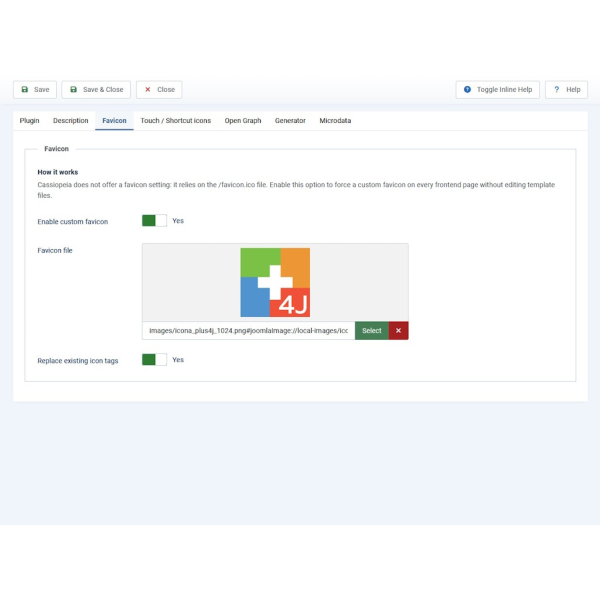
MultiTool lets you select a custom .ico, .png or .svg file directly through Joomla's Media Manager and automatically inserts the appropriate favicon tag into your site's <head>.
You can also choose to remove the existing favicon tags added by the template to avoid duplicate or conflicting declarations.
No template file editing is required.

Better icons for mobile devices and shortcuts

A browser favicon is only part of a site's visual identity.
MultiTool can also add the icons used when your website is saved to a device home screen or displayed as a shortcut.
Supported icon types include:
  • Apple Touch Icon - 180×180
  • PNG icon - 192×192
  • PNG icon - 512×512

This provides the appropriate icon references for iOS, Android and compatible PWA environments directly from Joomla's plugin settings.

Control how your pages look when they are shared

When someone shares a page on WhatsApp, Facebook, LinkedIn, Telegram or another compatible platform, the title, description and preview image are normally determined by Open Graph metadata.
MultiTool lets you configure these values directly from Joomla!®.
You can define:
  • site name
  • default title
  • default description
  • sharing image
  • Open Graph type
  • locale
  • Twitter/X Card support
Dynamic fallback
Instead of applying the same information to every page, MultiTool can automatically use the current page title and meta description whenever they are available.
The global values configured in the plugin are used only as fallbacks.
The page URL is generated dynamically as well, allowing the metadata to reflect the page actually being shared.

Keep, hide or customise the Joomla generator tag

Joomla normally adds a generator meta tag to the page source.
MultiTool gives you three options:
  • Keep the standard Joomla generator tag
  • Hide it completely
  • Replace it with your own custom text

A small setting, but one that would otherwise require another extension or a custom intervention.

Add structured data with JSON-LD

Plus4J MultiTool can inject Schema.org structured data directly into your pages using JSON-LD.
Choose the configuration that best represents the website:

Organization + WebSite
    Define organization information including:
  • name
  • URL
  • logo
  • social profiles
LocalBusiness
    Add business information such as:
  • telephone
  • street address
  • city
  • region
  • postal code
  • country
  • price range
  • latitude and longitude
  • opening hours
Person
    Create structured data for an individual, including:
  • name
  • URL
  • image
  • job title
  • social profiles
  • Custom JSON-LD

Advanced users can also provide their own valid JSON-LD block for cases that require a different schema.

Who is MultiTool for?

Plus4J MultiTool is designed for Joomla!® administrators, developers, web designers, and agencies who want practical control over common frontend metadata without unnecessary complexity.
It can be particularly useful for:
  • Joomla administrators using the Cassiopeia template
  • site builders who want to change favicons without editing template files
  • developers who need a quick way to configure Open Graph metadata
  • businesses that want better link previews on social and messaging platforms
  • local businesses that need basic Schema.org structured data
  • agencies managing multiple Joomla websites
  • technical users who prefer lightweight tools instead of installing several single-purpose extensions

How It Works

  1. Install MultiTool through System → Install → Extensions.
  2. Open System → Plugins and search for MultiTool.
  3. Enable the plugin.
  4. Save the settings.

MultiTool acts on the site frontend only and does not modify your Joomla!® template files.
Images are selected using Joomla's standard Media Manager.

MultiTool

Favicon Setting

MultiTool

Shortcut Setting

MultiTool

OpenGraph Setting

MultiTool

Generator Setting

MultiTool

Microdata Setting

Key Features

  • Custom Favicon – Use your own .ico, .png or .svg favicon, including with Cassiopeia.
  • Existing Icon Replacement – Remove existing favicon declarations to prevent duplicates.
  • Apple Touch Icon – Add a dedicated 180×180 home-screen icon for iOS.
  • 192×192 and 512×512 Icons – Add shortcut and PWA-compatible PNG icons.
  • Open Graph Metadata – Control titles, descriptions, images, site name, type and locale used for shared links.
  • Dynamic Page Metadata – Automatically reuse the current page title and meta description when available.
  • Twitter/X Cards – Add optional card metadata using the Open Graph information.
  • Generator Control – Keep, remove or customise Joomla's generator meta tag.
  • Schema.org JSON-LD – Add structured data for Organization, WebSite, LocalBusiness or Person.
  • Custom JSON-LD – Insert your own structured data when required.
  • Joomla Media Manager Integration – Select favicon, icons and images using the native media interface.
  • No Template Modifications – Configuration is handled entirely by the plugin.
  • Frontend Only – The plugin operates only where the generated metadata is required.
  • Subfolder Compatible – Image URLs are generated correctly even when Joomla is installed in a subdirectory.
  • Lightweight Approach - Several small but useful functions combined into one practical system plugin.

Why use MultiTool instead of separate extensions?

Each feature provided by MultiTool is relatively simple on its own.
The problem is that solving them individually can mean editing template files, adding overrides, inserting custom code, or installing several different plugins.
MultiTool keeps these related tasks together.
Instead of using one extension for the favicon, another for the generator tag, custom code for Open Graph metadata, and another solution for structured data, you can manage the essential settings from one Joomla!® plugin.
The result is a cleaner and more manageable setup, particularly for websites where these functions need to be configured quickly and maintained over time.

Frequently Asked Questions

Does MultiTool modify the Joomla template?
No. MultiTool works through Joomla's document system and does not modify template files.

Can I use it with Cassiopeia?
Yes. One of MultiTool's main practical uses is providing an easy way to set a custom favicon when using Cassiopeia.

Which favicon formats are supported?
You can select .ico, .png or .svg files through Joomla's Media Manager.

Can MultiTool replace an existing favicon?
Yes. It can remove existing icon declarations before adding the selected favicon, helping prevent duplicate tags.

Can I configure the image shown when a page is shared on WhatsApp?
Yes. The sharing image is configured through the Open Graph section using og:image. Touch icons and shortcut icons are separate and are not used for social sharing previews.

Will every page use the same Open Graph title and description?
Not necessarily. When Dynamic Fallback is enabled, MultiTool uses the current page title and meta description whenever Joomla!® provides them. The values configured in MultiTool are used as fallbacks.

Does it support Twitter/X Cards?
Yes. Twitter/X Card metadata can be enabled independently within the Open Graph configuration.

Can I remove the Joomla generator meta tag?
Yes. You can keep the default tag, hide it completely or replace its content with custom text.

What structured data can MultiTool generate?
MultiTool supports:
Organization + WebSite
LocalBusiness
Person
Custom JSON-LD

Can advanced users insert their own Schema.org data?
Yes. The Custom JSON-LD option accepts a valid JSON-LD block and outputs it directly in the document head.

Does MultiTool work when Joomla!® is installed in a subfolder?
Yes. URLs that need to be absolute, such as Open Graph images and JSON-LD images or logos, are generated accordingly.

Which Joomla versions are supported?
MultiTool version 1.0.0 is designed for Joomla!® 6.x.

Get Plus4J MultiTool

Simplify the small Joomla configuration tasks that too often require template edits, custom code or separate extensions.
Use one lightweight plugin to manage your favicon, device icons, social sharing metadata, generator tag and essential structured data directly from the Joomla administrator interface.
Choose DB Viewer Free for safe inspection, or upgrade to DB Manager when you need full database management tools.
Buy MultiTool

Get Plus4J MultiTool to take control of many settings of your website.

€19 – one time purchase
Lifetime usage. Secure checkout included.